Wednesday, May 23, 2012

How to Undo a Sent Email Message in Gmail


GmailEmails are widely used everywhere, every business deal is simply texted to other person and then its again relied by the medium of email, so when ever something important is texted than its really important to check the mail before we click the send button, as it can make out something else if we simply punch some wrong words. So do we have any alternate to Undo an email if its accidently send by us.
Well if you are on Gmail the answer is Yes, well its not like you will simply go to any of your past email you send before and now you will Undo that but its gonna apply to the emails which will be sent now after installing Undo Send feature from their Labs, check full steps below.

1. Navigate to your Gmail Settings :


So the first step is to visit your Mail settings which you can access by clicking that small Gear icon and than choosing Settings.
Gmail Settings

2. Now choose Labs :


Now in settings menu you will see a Labs option click that and you will get a normal search bar where you can type anything you want from Labs.
Gmail Labs


3. Now Search for “Undo Send”


Now simply make a search for “Undo Send” which is a simple Gmail Beta Plugin which will do all the wonders, now as soon as you Enable it and click on Save your Gmail will load again so that that plugin could be brought in action.
Undo Send Gmail Labs

4. Now Compose, Send and Check :


Now its time to see this extension in action, simply compose another email or reply to anyone else, type your message and than click on Send now you will see message send and small Undo Option to get that email back, click that and you email will be backed up in Drafts fro future use.
Undo Send
So now you have a perfect plugin for perfect emails when ever your emails get wrong just click that Undo Button and Voila ! emails back, have fun and do share this post if you like it.

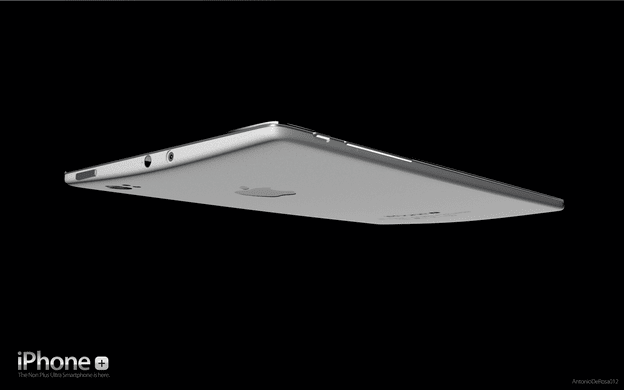
iPhone+ Amazingly Thin & Aluminicious iPhone concept


Soon after there a rumor that Apple will release another iPhone soon, many people try to come up with what it could be and what the worlds most finest technology brand and come up with. So we have another concept for iPhone names as iPhone+ from ADR Studio for the thinnest and aluminous concept for iPhone as said on Redmond Pie, so check all the images below for this future geeky gadget.
iPhone+ Amazingly Thin & Aluminicious iPhone concept iPhone+ Amazingly Thin & Aluminicious iPhone concept iPhone+ Amazingly Thin & Aluminicious iPhone concept iPhone+ Amazingly Thin & Aluminicious iPhone concept iPhone+ Amazingly Thin & Aluminicious iPhone concept iPhone+ Amazingly Thin & Aluminicious iPhone concept iPhone+ Amazingly Thin & Aluminicious iPhone concept
Hopefully this is just a concept and according to rumors from all over the world these concepts are created, maybe we will have our iPhone similar to this one hopefully releasing by October, well we will update your mind with any further news we receive on this one.

Are you Addicted to Facebook here are 6 Signs to Identify


Facebook-logoResearchers in Norway had identified 6 signs that states your addiction towards Facebook Community. The have also developed a test called "Bergen Facebook Addiction Scale" based on these signs. So below are the 6 signs and if you feel that you really found yourself into these signs that your addiction towards Facebook is lot high, well that don’t states that you are the alone person in the world with this kind of addiction, many more people also fall in this category.

6 Facebook Addiction Signs :

  • You spend a lot of time thinking about Facebook or plan use of Facebook.
  • You feel an urge to use Facebook more and more.
  • You use Facebook to forget about personal problems.
  • You have tried to cut down on the use of Facebook without success.
  • You become restless or troubled if you are prohibited from using Facebook.
  • You use Facebook so much that it has had a negative impact on your job/studies.
Well this is not yet finished and more deep analysis was conducted you can check the whole post @ livescience, hmm do comment if you feel you are addicted after reading signs above, hmmm I also felt strange that I am also addicted to Facebook but my using is too much low as I do not concentrate much on it, still there is a addiction and I have to loose it and get my focus on my real social life.

Facebook Updated their Notification Viewing Style


Today I was just browsing Facebook and as usual I just clicked on the notifications icon and what I saw is that its just updated with a brand new viewing style including scroll feature. Well now more old notifications, messages and friend request can be viewed without going in their particular section.
facebook notification
So now as you can see I just clicked on the notification icon and it opened a arrow like we have in the iOS devices + a nice scroll is added which allows you too view the old updates. Well it’s a nice update from Facebook and hopefully it will surely decrease some loading time on Facebook from your end.
The best thing is liked about this update is that now you can unfollow any post right from this notification pop, well as you will hover on any notification you will see a X icon clicking that you can unfollow that post which will not send and further notification to you about that post.

Just comment below if your layout is updated or not.